linux中的nginx启用ssi实现include包含html文件
SSI Server Side Include,是一种基于服务端的网页制作技术,大多数(尤其是基于Unix平台)的web服务器如Netscape Enterprise Server等均支持SSI命令。 它的工作原因是:在页面内容发送到客户端之前,使用SSI指令将文本、图片或代码信息包含到网页中。对于在多个文件中重复出现内容,使用SSI是一种简便的方法,将内容存入一个包含文件中即可,不必将其输入所有文件。通过一个非常简单的语句即可调用包含文件,此语句指示Web服务器将内容插入适当网页。而且,使用包含文件时,对内容的所有更改只需在一个地方就能完成。
Nginx配置
主要是三个参数,ssi,ssi_silent_errors和ssi_types,均可以放在http,server和location的作用域下。
ssi on
开启ssi支持,默认是offssi_silent_errors on
默认值是off,开启后在处理SSI文件出错时不输出错误提示:”[an error occurred while processing the directive] ”ssi_types
默认是ssi_types text/html,所以如果需要htm和html支持,则不需要设置这句,如果需要shtml支持,则需要设置:ssi_types text/shtml
Nginx实例
开启shtml后缀的文件名支持ssi
server{
ssi on;
ssi_silent_errors on;
ssi_types text/shtml;
}
开启html后缀的文件名支持ssi
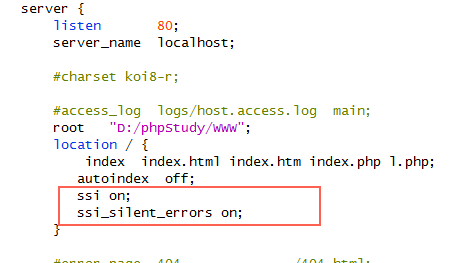
server{
ssi on;
ssi_silent_errors on;
}
只在fcbu_com目录下开启shtml后缀的文件名支持ssi
server{
location /fcbu_com/{
ssi on;
ssi_types text/shtml;
ssi_silent_errors on;
}
}
动态内容包含
在HTML页面中可以通过以下命令包含另一个包含动态内容的页面:
<!--#include virtual="/bottom.shtml" -->或<!--#include file="/bottom.shtml" -->
virtual和file的区别
关于 Nginx SSI 中 <!--#include virtual="/bottom.shtml" --> 和 <!--#include file="/bottom.shtml" --> 指令的详细说明:
1. 指令类型
file 指令
<!--#include file="/bottom.shtml" -->
- 作用:包含服务器文件系统中的文件(绝对路径)。
- 路径:从 Nginx 配置的 root 目录开始计算绝对路径(如 /var/www/html/bottom.shtml)。
- 适用场景:适用于静态文件或需通过 Nginx 直接访问的文件。
virtual 指令
<!--#include virtual="/bottom.shtml" -->
- 作用:包含通过 Nginx 处理的虚拟路径(相对路径)。
- 路径:基于请求的上下文解析(如 /bottom.shtml 会被解析为 http://example.com/bottom.shtml)。
- 适用场景:适用于需要通过 Nginx 重写规则或代理处理的资源。
2. 路径解析对比
| 指令类型 | 路径解析方式 | 示例 |
|---|---|---|
| file | 绝对路径(从 root 目录) | /var/www/html/bottom.shtml |
| virtual | 相对路径(基于请求上下文) | http://example.com/bottom.shtml |
3. 使用建议
- 静态资源:优先使用 file 指令(性能更优)。
- 动态资源:使用 virtual 指令(支持 Nginx 重写规则)。
- 注意事项:
- file 指令路径需确保 Nginx 有读取权限。
- virtual 指令路径需避免循环包含。
本文由主机测评网发布,不代表主机测评网立场,转载联系作者并注明出处:https://zhuji.jb51.net/qtcms/11488.html